
How to change the language of Google Chrome and Chromium on Linux
April 19, 2021
If you look at the process of changing the language in Google Chrome or Chromium in Windows, then everything is quite simple there: you need to enter chrome://settings/languages in the address bar of the browser, or you can use the menu: Settings → Advanced → Languages. Then expand the “Language” item, select the desired language and click on the three vertical dots opposite it. Then just click “Display Google Chrome in this language”:

But if you open Google Chrome or Chromium in Linux, then the inscription “Display Google Chrome in this language” is missing:
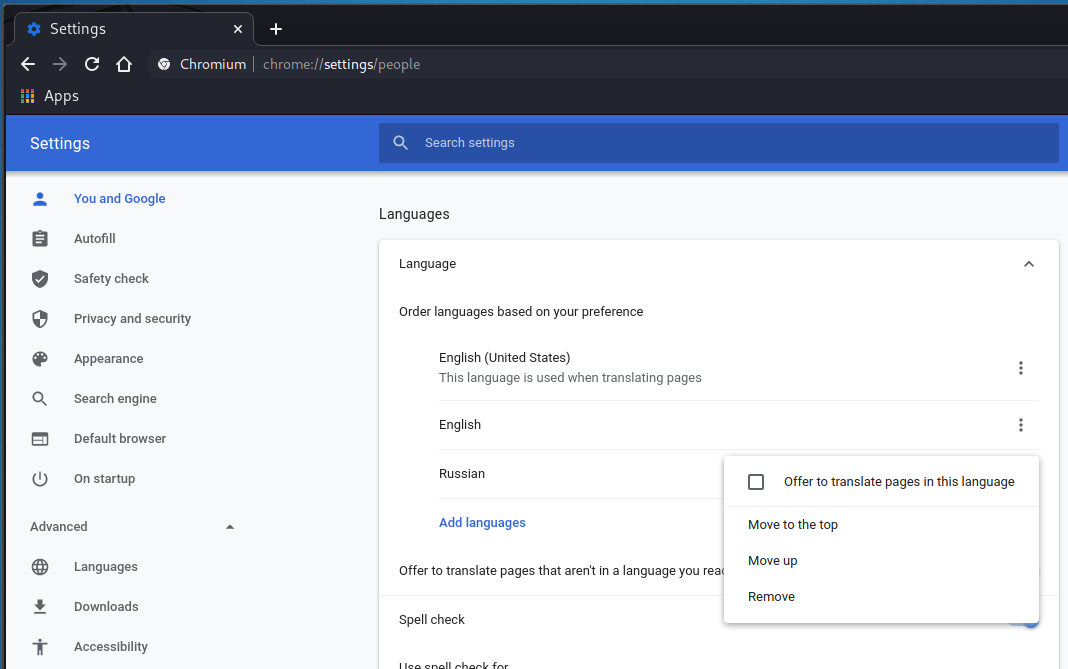
The inscription “Display Google Chrome in this language” not showing
Since Google Chrome and Chromium on Linux lacks the “Display Google Chrome in this language” menu, the question arises – how to change the browser language in Linux?
Apparently, it is impossible to change the language in the graphical interface – but it can be done on the command line.
To change the language, you need to assign the appropriate value to the environment variable LC_MESSAGES. For example, changing the language to English:
export LC_MESSAGES=en_US.UTF-8
Changing the language to Russian:
export LANG=ru_RU.UTF-8
Change language to French:
export LANG=fr_FR.UTF-8
After that, launch the Chromium browser:
chromium
Or Chrome:
google-chrome-stable
In order not to remember and not to enter commands on the command line every time, you can create a file chromium-en.sh and copy into it:
#!/bin/bash

export LC_MESSAGES=en_US.UTF-8
chromium
If you want Chrome to start this way, replace chromium with google-chrome-stable.
Make this file executable. After that, you will be able to launch the web browser in the language you need with a double click.
For Chrome, there is an additional ability to change the language without changing the value of the LC_MESSAGES variable – you can use the --lang option, after which specify the two-letter code of the desired language:
google-chrome-stable --lang=en
Please note that if the web browser is already open, then regardless of the specified option, a new window will be opened within the current session, that is, with the same interface language with which the first window was opened.
Is it possible to change the language of Google Chrome and Chromium on Linux in the GUI?
All attempts to find an option to change the language in the Web Browser Settings or in the experimental settings available in the chrome://flags/ tab were unsuccessful. Apparently, it is impossible to change the browser language in the graphical interface. If you know this method, then write it in the comments!
Related articles:
- Chromium will no longer sync passwords - what should Linux users do? (86.6%)
- Custom Google Chrome settings for each computer user (86.6%)
- How to enable 10-bit color depth on Linux (and whether to enable 30-bit color) (73.2%)
- Why Google Chrome web browser is gray when 10-bit color is enabled and how to fix it (73.2%)
- How to watch HDR videos on YouTube on Linux (73.2%)
- Instructions for using the file command (RANDOM - 50%)

Hi, sorry, i'm a bit late ;-)Thanks for your valuable tips regarding configurating the desktop language in Chromium under Linux. I managed finally to change the command line language on my Chromebook and in Chrome to german. BUT, when i save a website with chromium the folder is still named "_files" NOT "-Dateien"
as it is usual in Linux (Mint) e.g. with Firefox or with "Palemoon (Vers. 33.8.2). I do think that has to do with the development of "Chrome" or "Chromium" with regard to the still growing Cloud boom.
BUT: In the command line help of "Chromium" i found the advice to look at the GTK documentation AS CHROMIUM IS A GTK+ APP!
"http://library.gnome.org/devel/gtk/stable/gtk-running.html" doesn't exist any more but this:
"https://web.archive.org/web/20230701000000*/http://library.gnome.org/devel/gtk/stable/gtk-running.html"
"http://library.gnome.org/devel/gtk/stable/gtk-x11.html" doesn't exist any more but this:
"https://web.archive.org/web/20100702231020/http://library.gnome.org/devel/gtk/stable/gtk-x11.html"
Today there exist e.g. this URL for Gnome, when you enter "http://library.gnome.org" in your browser:
"User & system settings -> Region & Language -> Change which language you use":
Change which language you use
https://help.gnome.org//gnome-help/session-language.html
I'm running Linux in a Container with crosh respectively with Chrome-OS. The funny thing is: Chrome has german menus as well as the Textpad-App and the Terminal-App. The applications which i installed in the Linux container all do have english as a menu language. Maybe it is also a problem of installing a special package in the Linux-Container, e.g. for german: "language-pack-de", "language-pack-de-base" and "language-pack-gnome-de-base".