
How to install PowerShell on Arch Linux, Manjaro, BlackArch
Posted by Alex On March 25, 2021
PowerShell on Linux PowerShell is a cross-platform automation and configuration tool/platform. PowerShell has a large number of system administration-oriented commands. But at the same time, PowerShell is a full-fledged programming language that allows you to write functional programs (scripts). Note that PowerShell 5 is currently preinstalled on Windows by default, but this manual shows the […]

How to install PowerShell in Linux Mint
Posted by Alex On March 25, 2021
The PowerShell installation instructions often forget about Linux Mint, apparently, their authors believe that Linux Mint users do not need PowerShell. Let's fill that gap and take a look at how to install PowerShell in Linux Mint. Linux Mint has several versions - “regular”, which, by the way, also differs in desktop environments (Cinnamon, MATE, […]
Linux PowerShell Basics (Beginner's Guide)
Posted by Alex On March 25, 2021
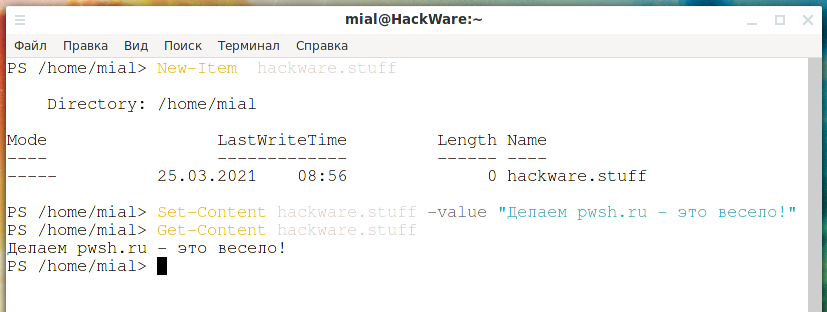
PowerShell for Linux In recent years, there has been a trend at Microsoft to cross-platform some of its products and open their source. Also Linux itself became part of Windows in the form of a subsystem. PowerShell, which was originally a Windows-only component, was released as open source and became cross-platform on August 18, 2016, […]
How to enable spell checker in Google Chrome. How to add languages for spell checker
Posted by Alex On March 18, 2021
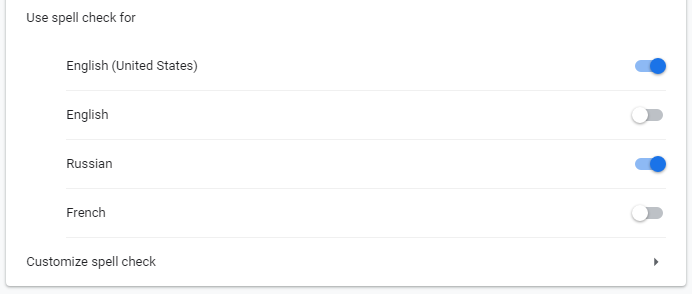
The Google Chrome web browser has a built-in spell checker, which is very convenient when writing messages, comments on websites, communicating in web chats, and so on. You can configure the spell checker: choose offline or online checker (more accurate), as well as enable or disable languages for spell checking. Online and offline spell checker […]

How to display all environment variables at the Windows command prompt
Posted by Alex On March 16, 2021
This article will show you how to display all environment variables from the Windows command line. PowerShell and CMD First of all, you need to distinguish what kind of program you are working in. The first appeared CMD - Windows command line, shell. For many years, CMD was the only option for running on the […]

How to install a web server (Apache, PHP, MySQL, phpMyAdmin) on Linux Mint, Ubuntu and Debian
Posted by Alex On March 16, 2021
If you are a webmaster, or a PHP programmer, or you just need to run a website on your computer, then you can do it using a web server. On Linux, the web server (Apache) and related components (PHP, MySQL, phpMyAdmin) are installed in just a few commands. This tutorial will show you how to […]

How to find out which shell is in use in Linux
Posted by Alex On March 15, 2021
Linux shells There are several Linux shells, each with its own characteristics. Examples of popular shells are Bash (which is the default shell on many distributions) and ZSH (which is the default shell on Kali Linux, it has many fans). The shell information is contained in the $SHELL environment variable to see its value and […]
What is open_basedir for and how to use open_basedir
Posted by Alex On March 15, 2021
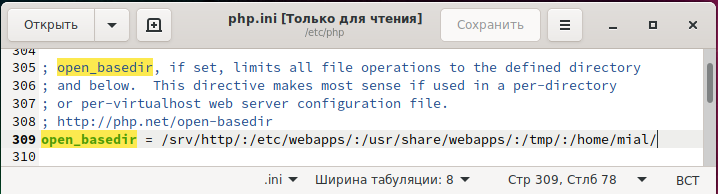
The open_basedir directive is specified in the PHP configuration file (php.ini) and sets the directories that PHP can access. Access refers to any actions with files: opening (for example, fopen() or gzopen()), writing and executing. If the open_basedir directive is set and an attempt is made to run a file that is outside the listed […]

How to find and remove non-UTF-8 characters from a text file
Posted by Alex On March 14, 2021
Filtering invalid UTF-8 characters Files that, in addition to ordinary characters, contain characters that are invalid from the UTF-8 point of view, cause a problem both when they are processed by utilities and when opened in text editors. An example of an error in Python 3 when trying to process a file with non-UTF-8 characters: […]
How to add the plugin to Double Commander to support all types of archives
Posted by Alex On March 12, 2021
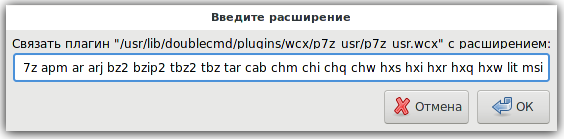
What archives does Double Commander support? Double Commander is an excellent open source two-window file manager. If you want to know more details about it, then see the article “Free analogue of Total Commander”. Double Commander, thanks to built-in plugins, out of the box supports working with the most popular archives: zip, jar, tar, bz2, […]